
Bilgi Bankası
Oluşturma
Değiştirme
Değiştirme
How to switch to simplified ribbon
The simplified ribbon works in the same way that the traditional ribbon does. There are tabs across the top, and commands on each tab. The simplified ribbon, however, is more streamlined to use less space on the screen.
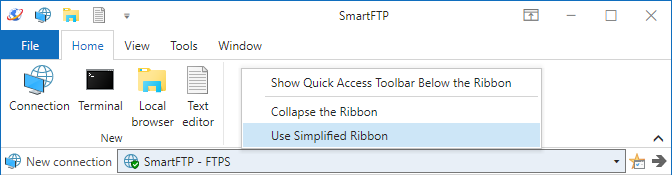
To switch to the simplified ribbon, right-click on the ribbon and then select Use Simplified Ribbon from the context menu.
Anahtar Kelimeler
ribbon
What do you think about this topic? Send feedback!