Switch from FFFTP
Benefits
- Faster Transfers
Ever wondered why your transfers are so slow? SmartFTP is up to 200% faster than FFFTP.
- Secure Transfers
Unlike FFFTP, SmartFTP transfers your files over a secure connection.
- Japanese Language
SmartFTP is available in Japanese and has no problems handling Japanese file and directory names.
- Modern User Interface
Modern and fully customizable interface. Arrange everything how you want it.
See All Features
Installation and Import
- Download and Install SmartFTP
- Install the Japanese Language Addon (menu: Tools->Settings, Interface->Language)
- Start SmartFTP
- Go to the main menu: Favorites->Edit Favorites
- In the Favorites window, go to the menu: Tools -> Import
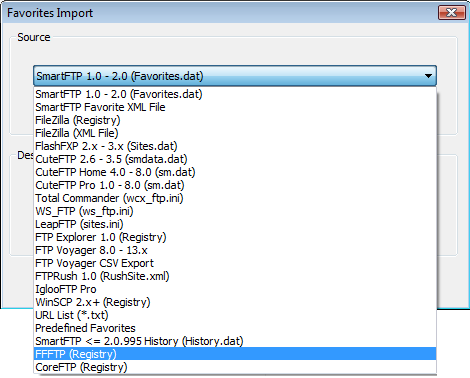
- Select FFFTP (Registry) from the combo box
- Click OK
- All sites, including their passwords, are imported
- Click a newly imported favorite to connect to the server
References